Suno Style Extractor
See the style tags behind any public Suno song and reuse them in your own prompts.
Don't have a link?
See the Style Tags Behind Any Suno Song
Ever heard a Suno track and wondered how it was made? This free style extractor reads the public style tags of any Suno song — the same text its creator typed into the style box. Paste a link, copy the tags, and use them as a starting point for your own music.
Learn from songs you love
Instead of guessing genre names, see the exact tag combinations behind tracks you admire — and what makes them sound the way they do.
One-click tag copying
Copy the full style string in one click and paste it straight into Suno’s style field. The lyrics are right there too for structure ideas.
Free, with no account
Works with any public Suno share link right in your browser. No sign-up, no limits, and the song preview plays before you copy anything.
How to Extract a Suno Song’s Style
Open the public Suno song you’re curious about, copy its share link, and paste the URL into the extractor above. Once the track loads, its style tags appear as chips — hit copy and they’re ready to paste into Suno.
- 1
Copy the Suno share link
Open Suno, find the public song whose style you want to see, and copy its share URL.
- 2
Paste the URL
Paste the Suno song link into the style extractor input field.
- 3
Copy the style tags
Fetch the track, review its style tags and lyrics, then copy the tags for your own Suno prompts.
How to Use Extracted Style Tags
Treat extracted tags as a recipe, not a rule. Suno responds best to a focused set of 8–14 tags covering genre, mood, instruments, vocals, and tempo. Keep the strongest tags from the song you analyzed, swap the mood or vocal style for your own, and generate a few variations. Combining tags from two songs you love is a quick way to land on a sound that feels like yours.
Want to keep the song itself, too? Save it with the free Suno downloader
How to Download Suno AI Music
Visit Suno.ai
Copy Link
Download
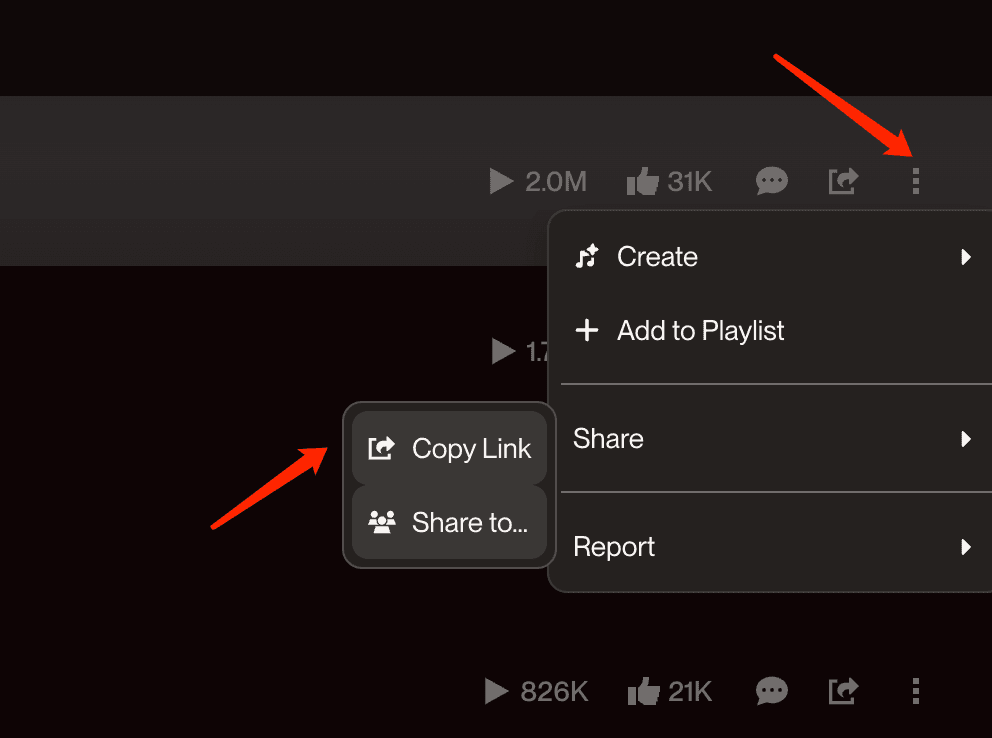
Click share button to get the link
Suno Style Extractor FAQ
- •Partly. This tool shows a song’s public style tags — the text its creator put in the style box — along with the lyrics.
- •Private generation settings such as personas, seeds, or advanced options are not published by Suno, so no tool can read those.
- •They are read from the public Suno song page itself. Suno publishes each public song’s style tags, and the extractor simply surfaces them.
- •You get exactly what the creator entered — or what Suno generated for them — with no guessing involved.
- •Copy the tags with one click, open Suno, and paste them into the style field of a new song.
- •A good rule of thumb is 8–14 focused tags: keep the strongest ones, swap the mood or vocals to match your idea, and generate a couple of variations.
No. The extractor only works with public Suno share links and does not bypass private or restricted content.
Yes. Paste as many public Suno links as you like — no account, no fees, no limits.