Suno to WAV
Convert public Suno songs to WAV audio right in your browser — no Pro plan needed.
Don't have a link?
Convert Suno to WAV Online
Suno reserves WAV downloads for its paid plans. This free Suno to WAV converter takes the public MP3 audio of a Suno song, decodes it in your browser, and repackages it as an uncompressed 16-bit WAV file — no Pro subscription, no sign-up, and nothing uploaded to a server.
WAV without a Pro plan
Save a WAV file from any public Suno song without paying for Suno Pro or Premier — handy for editors and DAWs that expect WAV input.
Private in-browser conversion
The MP3 is decoded and rebuilt as a WAV locally by your browser’s audio engine. The audio never touches our servers.
MP3 download included
Every song you fetch also offers the original MP3, so you can save both formats in one visit.
How to Convert Suno to WAV
Open the public Suno song you want, copy its share link, and paste the URL into the converter above. After the track loads, preview the audio, then press the WAV button — your browser converts the song and saves it as a .wav file.
- 1
Copy the Suno share link
Open Suno, find the public song you want as WAV, and copy its share URL.
- 2
Paste the URL
Paste the Suno song link into the Suno to WAV input field.
- 3
Download the WAV
Fetch the track, preview the audio, then press the WAV button to convert and save the file.
Does Converting to WAV Improve Sound Quality?
No — and no online converter can. The WAV produced here contains exactly the audio of Suno’s public MP3 stream, unpacked into an uncompressed container. That is still exactly what you need when a video editor, DAW, or DJ tool refuses MP3 files or re-encodes them badly: WAV imports cleanly, cuts precisely, and avoids adding another lossy generation to your project.
Just want a smaller file for offline listening? Use the Suno to MP3 downloader
How to Download Suno AI Music
Visit Suno.ai
Copy Link
Download
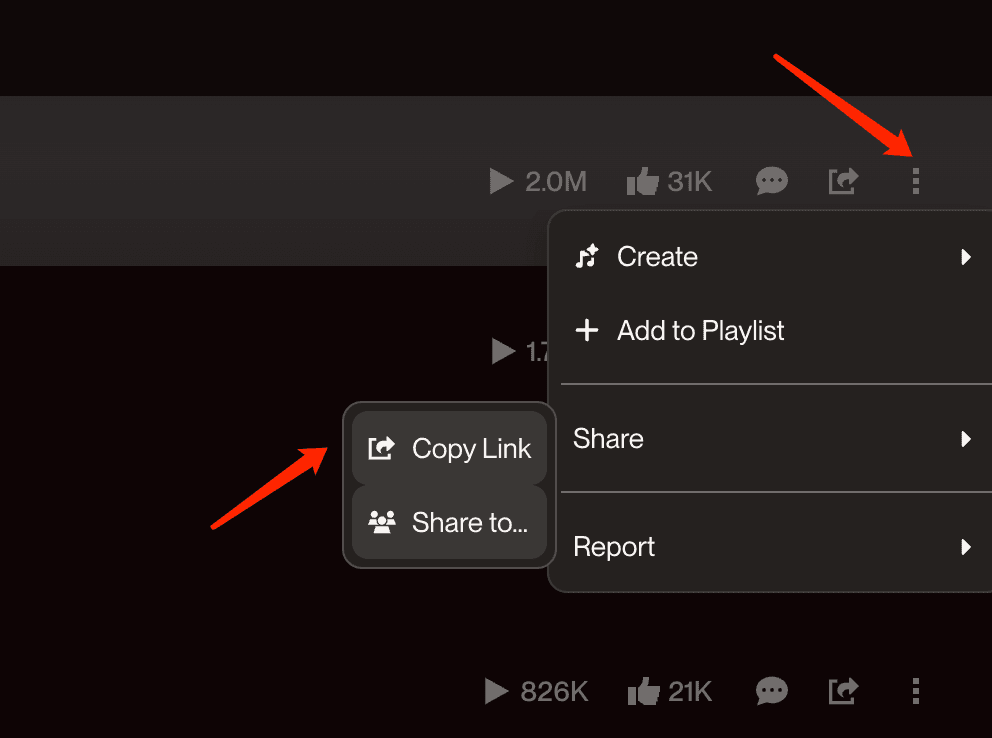
Click share button to get the link
Suno to WAV FAQ
- •Yes. Suno only offers native WAV export on its paid Pro and Premier plans, but this tool works with any public song.
- •It takes the public MP3 audio of the song, decodes it in your browser, and repackages it as an uncompressed WAV file you can save — no Suno subscription, no account, no fees.
- •The WAV container itself is lossless, but the source audio comes from Suno’s public MP3 stream, so the WAV cannot contain more detail than that MP3.
- •No converter on any website can restore data that MP3 compression removed. What you get here is an exact unpacking of the MP3 audio into WAV — nothing more, nothing less.
- •Entirely on your device. Your browser downloads the MP3, decodes it with its built-in audio engine, and writes the WAV file locally.
- •The audio is never uploaded to our servers, which keeps the conversion fast and private.
- •You get a standard 16-bit PCM WAV file at the sample rate of the source audio (typically 44.1 kHz, stereo), which every DAW, video editor, and DJ tool accepts.
- •Note that WAV files are much larger than MP3s — a 3-minute song is roughly 30 MB as WAV versus about 3 MB as MP3.
- •Choose WAV when you plan to edit the track: video editors, DAWs, and DJ software import WAV more reliably, cut it more precisely, and avoid re-encoding the audio a second time.
- •If you just want to listen offline, MP3 is smaller and more convenient — this page lets you download both.