Suno Vocal Remover
Split any public Suno song into a clean instrumental and isolated vocals — free AI separation that runs in your browser.
Don't have a link?
Free AI Vocal Remover for Suno Songs
Suno only offers stem separation on its paid plans, and every split costs credits. This free vocal remover works with any public Suno song: paste a share link and an AI model splits the track into a karaoke-ready instrumental and an isolated acapella — entirely on your device.
Instrumental and acapella together
One separation pass produces both stems: a clean instrumental for karaoke, remixes, or video, and an isolated vocal track — each downloadable as a studio-friendly WAV file.
Private by design
The AI model runs inside your browser with WebGPU acceleration. Your music is never uploaded to a server, and there are no queues, accounts, or per-song limits.
No Suno credits needed
Suno’s built-in stem splitting is reserved for paid plans and costs credits per song. This tool works with any public Suno link — free and unlimited.
How to Remove Vocals from a Suno Song
The flow matches every other tool on this site: paste a public Suno share link, fetch the track, then press Remove Vocals. The first run downloads the AI model once; after that it is cached and separation starts immediately.
- 1
Copy the Suno song link
Open Suno, find the public song you want to split, and copy its share URL.
- 2
Fetch the song
Paste the link into the vocal remover above and fetch the track preview.
- 3
Remove vocals and download
Press Remove Vocals, let the AI finish, then preview and download the instrumental or acapella as WAV.
How Clean Is the Separation?
Separation runs on MDX-Net (Kim Vocal 2), one of the highest-rated open models for vocal isolation — the same model family behind popular stem-splitting services. AI-generated songs usually separate cleanly; very dense mixes or heavy vocal effects can leave a faint vocal residue in the instrumental.
Just need the original song file without separation? Use the Suno to MP3 downloader
How to Download Suno AI Music
Visit Suno.ai
Copy Link
Download
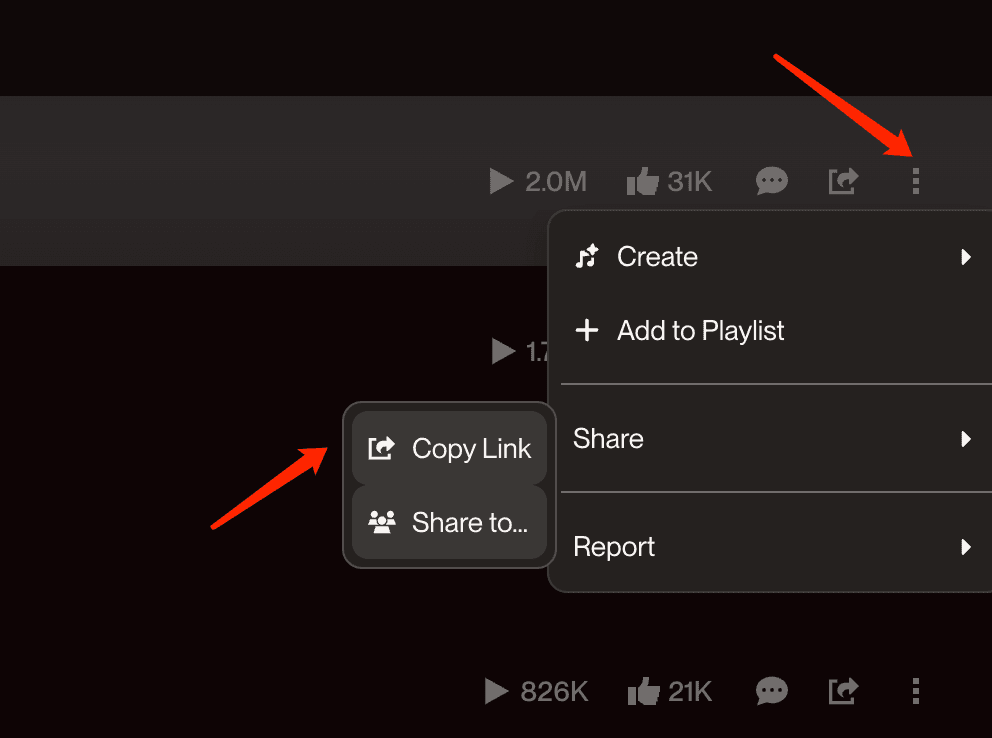
Click share button to get the link
Suno Vocal Remover FAQ
- •Yes. The AI model runs on your own device instead of an expensive GPU server, so there is nothing for us to meter — no accounts, no credits, no daily caps.
- •The trade-off is that your computer does the work: separation takes a minute or two rather than a few seconds.
- •Suno’s own Get Stems feature is only available on paid plans and consumes credits per split, but it can produce up to 12 separate tracks from songs in your library.
- •This tool is the free alternative for the most common need: it takes any public Suno link and returns two stems — instrumental and vocals — without a subscription.
- •No. The browser downloads the public MP3, and the neural network separates it locally using WebGPU or WebAssembly.
- •Nothing you process here ever leaves your device — the same privacy model as our Suno to WAV converter.
- •The separation uses MDX-Net (Kim Vocal 2), one of the top-rated open vocal-isolation models, and AI-generated songs usually split very cleanly.
- •Tracks with heavy reverb, stacked harmonies, or shouted ad-libs can leave a faint vocal ghost in the instrumental — that is a limit of every separator, including paid ones.
- •A full neural network runs on your device: the first visit downloads the model once, then the song is analyzed in overlapping chunks.
- •Browsers with WebGPU (recent Chrome and Edge) are several times faster than the WebAssembly fallback, and desktop computers are much faster than phones.
- •Both stems are standard 16-bit 44.1 kHz stereo WAV files that import cleanly into any DAW, video editor, or karaoke app.
- •The original MP3 stays available on the same page, so you can keep the full mix alongside the stems.